Introduction
Chronos implements the async/await paradigm in a self-contained library using macro and closure iterator transformation features provided by Nim.
Features include:
- Asynchronous socket and process I/O
- HTTP client / server with SSL/TLS support out of the box (no OpenSSL needed)
- Synchronization primitivies like queues, events and locks
- Cancellation
- Efficient dispatch pipeline with excellent multi-platform support
- Exception effect support
Installation
Install chronos using nimble:
nimble install chronos
or add a dependency to your .nimble file:
requires "chronos"
and start using it:
import chronos/apps/http/httpclient

proc retrievePage*(uri: string): Future[string] {.async.} =
  # Create a new HTTP session
  let httpSession = HttpSessionRef.new()
  try:
    # Fetch page contents
    let resp = await httpSession.fetch(parseUri(uri))
    # Convert response to a string, assuming its encoding matches the terminal!
    bytesToString(resp.data)
  finally: # Close the session
    await httpSession.closeWait()

echo waitFor retrievePage(
  "https://raw.githubusercontent.com/status-im/nim-chronos/master/README.md"
)
There are more examples throughout the manual!
Platform support
Several platforms are supported, with different backend options:
API documentation
This guide covers basic usage of chronos - for details, see the API reference:
- chronos
- httpagent
- httpbodyrw
- httpclient
- httpcommon
- httpdebug
- httpserver
- httptable
- multipart
- shttpserver
Examples
Examples are available in the examples/ folder.
Basic concepts
- cancellation - Cancellation primer
- timeoutsimple - Simple timeouts
- timeoutcomposed - Shared timeout of multiple tasks
Threads
- signalling - Cross-thread signalling
TCP
- tcpserver - Simple TCP/IP v4/v6 echo server
- tcpserver2 - TCP/IP v4/6 echo server with graceful shutdown
- tcpclient - Simple multi-connection echo client
HTTP
- httpget - Downloading a web page using the http client
- twogets - Download two pages concurrently
- middleware - Deploy multiple HTTP server middlewares
Concepts
Async/await is a programming model that relies on cooperative multitasking to coordinate the concurrent execution of procedures, using event notifications from the operating system or other treads to resume execution.
Code execution happens in a loop that alternates between making progress on tasks and handling events.
The dispatcher
The event handler loop is called a "dispatcher" and a single instance per thread is created, as soon as one is needed.
Scheduling is done by calling async procedures that return
Future objects - each time a procedure is unable to make further
progress, for example because it's waiting for some data to arrive, it hands
control back to the dispatcher which ensures that the procedure is resumed when
ready.
A single thread, and thus a single dispatcher, is typically able to handle thousands of concurrent in-progress requests.
The Future type
Future objects encapsulate the outcome of executing an async procedure. The
Future may be pending meaning that the outcome is not yet known or
finished meaning that the return value is available, the operation failed
with an exception or was cancelled.
Inside an async procedure, you can await the outcome of another async
procedure - if the Future representing that operation is still pending, a
callback representing where to resume execution will be added to it and the
dispatcher will be given back control to deal with other tasks.
When a Future is finished, all its callbacks are scheduled to be run by
the dispatcher, thus continuing any operations that were waiting for an outcome.
The poll call
To trigger the processing step of the dispatcher, we need to call poll() -
either directly or through a wrapper like runForever() or waitFor().
Each call to poll handles any file descriptors, timers and callbacks that are ready to be processed.
Using waitFor, the result of a single asynchronous operation can be obtained:
proc myApp() {.async.} =
  echo "Waiting for a second..."
  await sleepAsync(1.seconds)
  echo "done!"

waitFor myApp()
It is also possible to keep running the event loop forever using runForever:
proc myApp() {.async.} =
  while true:
    await sleepAsync(1.seconds)
    echo "A bit more than a second passed!"

let future = myApp()
runForever()
Such an application never terminates, thus it is rare that applications are structured this way.
Both waitFor and runForever call poll which offers fine-grained
control over the event loop steps.
Nested calls to poll - directly or indirectly via waitFor and runForever
are not allowed.
Cancellation
Any pending Future can be cancelled. This can be used for timeouts, to start
multiple parallel operations and cancel the rest as soon as one finishes,
to initiate the orderely shutdown of an application etc.
## Simple cancellation example

import chronos

proc someTask() {.async.} =
  await sleepAsync(10.minutes)

proc cancellationExample() {.async.} =
  # Start a task but don't wait for it to finish
  let future = someTask()

  # `cancelSoon` schedules but does not wait for the future to get cancelled -
  # it might still be pending here
  future.cancelSoon()

  let future2 = someTask() # Start another task concurrently
  await future2.cancelAndWait()
  # Using `cancelAndWait`, we can be sure that `future2` is either
  # complete, failed or be cancelled at this point. `future` could still be
  # pending!
  assert future2.finished()

waitFor cancellationExample()
Even if cancellation is initiated, it is not guaranteed that the operation gets cancelled - the future might still be completed or fail depending on the order of events in the dispatcher and the specifics of the operation.
If the future indeed gets cancelled, await will raise a
CancelledError as is likely to happen in the following example:
proc c1 {.async.} =
  echo "Before sleep"
  try:
    await sleepAsync(10.minutes)
    echo "After sleep" # not reach due to cancellation
  except CancelledError as exc:
    echo "We got cancelled!"
    # `CancelledError` is typically re-raised to notify the caller that the
    # operation is being cancelled
    raise exc

proc c2 {.async.} =
  await c1()
  echo "Never reached, since the CancelledError got re-raised"

let work = c2()
waitFor(work.cancelAndWait())
The CancelledError will now travel up the stack like any other exception.
It can be caught for instance to free some resources and is then typically
re-raised for the whole chain operations to get cancelled.
Alternatively, the cancellation request can be translated to a regular outcome
of the operation - for example, a read operation might return an empty result.
Cancelling an already-finished Future has no effect, as the following example
of downloading two web pages concurrently shows:
## Make two http requests concurrently and output the one that wins

import chronos
import ./httpget

proc twoGets() {.async.} =
  let futs = @[
    # Both pages will start downloading concurrently...
    httpget.retrievePage("https://duckduckgo.com/?q=chronos"),
    httpget.retrievePage("https://www.google.fr/search?q=chronos"),
  ]

  # Wait for at least one request to finish..
  let winner = await one(futs)
  # ..and cancel the others since we won't need them
  for fut in futs:
    # Trying to cancel an already-finished future is harmless
    fut.cancelSoon()

  # An exception could be raised here if the winning request failed!
  echo "Result: ", winner.read()

waitFor twoGets()
Ownership
When calling a procedure that returns a Future, ownership of that Future is
shared between the callee that created it and the caller that waits for it to be
finished.
The Future can be thought of as a single-item channel between a producer and a
consumer. The producer creates the Future and is responsible for completing or
failing it while the caller waits for completion and may cancel it.
Although it is technically possible, callers must not complete or fail
futures and callees or other intermediate observers must not cancel them as
this may lead to panics and shutdown (ie if the future is completed twice or a
cancalletion is not handled by the original caller).
noCancel
Certain operations must not be cancelled for semantic reasons. Common scenarios include composed operations whose individual steps should be performed together or not at all.
In such cases, the noCancel modifier to await can be used to temporarily
disable cancellation propagation, allowing the operation to complete even if
the caller initiates a cancellation request:
proc deepSleep(dur: Duration) {.async.} =
  # `noCancel` prevents any cancellation request by the caller of `deepSleep`
  # from reaching `sleepAsync` - even if `deepSleep` is cancelled, its future
  # will not complete until the sleep finishes.
  await noCancel sleepAsync(dur)

let future = deepSleep(10.minutes)

# This will take ~10 minutes even if we try to cancel the call to `deepSleep`!
await cancelAndWait(future)
`noCancel` is only needed for functions that do not handle cancellation internally. You can spot them by looking at what they raise: if a proc raises `CancelledError` and you want to explicitly prevent it from being cancellable, put a `noCancel` before its call.

Functions that don't raise `CancellationError`, e.g. `closeWait`, do not need it.
join
The join modifier to await allows cancelling an async procedure without
propagating the cancellation to the awaited operation. This is useful when
await:ing a Future for monitoring purposes, ie when a procedure is not the
owner of the future that's being await:ed.
One situation where this happens is when implementing the "observer" pattern, where a helper monitors an operation it did not initiate:
var tick: Future[void]
proc ticker() {.async.} =
  while true:
    tick = sleepAsync(1.second)
    await tick
    echo "tick!"

proc tocker() {.async.} =
  # This operation does not own or implement the operation behind `tick`,
  # so it should not cancel it when `tocker` is cancelled
  await join tick
  echo "tock!"

let
  fut = ticker() # `ticker` is now looping and most likely waiting for `tick`
  fut2 = tocker() # both `ticker` and `tocker` are waiting for `tick`

# We don't want `tocker` to cancel a future that was created in `ticker`
waitFor fut2.cancelAndWait()

waitFor fut # keeps printing `tick!` every second.
Compile-time configuration
chronos contains several compile-time
configuration options enabling stricter compile-time
checks and debugging helpers whose runtime cost may be significant.
Strictness options generally will become default in future chronos releases and
allow adapting existing code without changing the new version - see the
config.nim module for more information.
Async procedures
Async procedures are those that interact with chronos to cooperatively
suspend and resume their execution depending on the completion of other
async procedures, timers, tasks on other threads or asynchronous I/O scheduled
with the operating system.
Async procedures are marked with the {.async.} pragma and return a Future
indicating the state of the operation.
The async pragma
The {.async.} pragma will transform a procedure (or a method) returning a
Future into a closure iterator. If there is no return type specified,
Future[void] is returned.
proc p() {.async.} =
  await sleepAsync(100.milliseconds)

echo p().type # prints "Future[system.void]"
await keyword
The await keyword operates on Future instances typically returned from an
async procedure.
Whenever await is encountered inside an async procedure, control is given
back to the dispatcher for as many steps as it's necessary for the awaited
future to complete, fail or be cancelled. await calls the
equivalent of Future.read() on the completed future to return the
encapsulated value when the operation finishes.
proc p1() {.async.} =
  await sleepAsync(1.seconds)

proc p2() {.async.} =
  await sleepAsync(1.seconds)

proc p3() {.async.} =
  let
    fut1 = p1()
    fut2 = p2()
  # Just by executing the async procs, both resulting futures entered the
  # dispatcher queue and their "clocks" started ticking.
  await fut1
  await fut2
  # Only one second passed while awaiting them both, not two.

waitFor p3()
Because `async` procedures are executed concurrently, they are subject to many
of the same risks that typically accompany multithreaded programming.

In particular, if two `async` procedures have access to the same mutable state,
the value before and after `await` might not be the same as the order of execution is not guaranteed!
Raw async procedures
Raw async procedures are those that interact with chronos via the Future
type but whose body does not go through the async transformation.
Such functions are created by adding raw: true to the async parameters:
proc rawAsync(): Future[void] {.async: (raw: true).} =
  let fut = newFuture[void]("rawAsync")
  fut.complete()
  fut
Raw functions must not raise exceptions directly - they are implicitly declared
as raises: [] - instead they should store exceptions in the returned Future:
proc rawFailure(): Future[void] {.async: (raw: true).} =
  let fut = newFuture[void]("rawAsync")
  fut.fail((ref ValueError)(msg: "Oh no!"))
  fut
Raw procedures can also use checked exceptions:
proc rawAsyncRaises(): Future[void] {.async: (raw: true, raises: [IOError]).} =
  let fut = newFuture[void]()
  assert not (compiles do: fut.fail((ref ValueError)(msg: "uh-uh")))
  fut.fail((ref IOError)(msg: "IO"))
  fut
Callbacks and closures
Callback/closure types are declared using the async annotation as usual:
type MyCallback = proc(): Future[void] {.async.}

proc runCallback(cb: MyCallback) {.async: (raises: []).} =
  try:
    await cb()
  except CatchableError:
    discard # handle errors as usual
When calling a callback, it is important to remember that it may raise exceptions that need to be handled.
Checked exceptions can be used to limit the exceptions that a callback can raise:
type MyEasyCallback = proc(): Future[void] {.async: (raises: []).}

proc runCallback(cb: MyEasyCallback) {.async: (raises: [])} =
  await cb()
Errors and exceptions
Exceptions
Exceptions inheriting from CatchableError
interrupt execution of an async procedure. The exception is placed in the
Future.error field while changing the status of the Future to Failed
and callbacks are scheduled.
When a future is read or awaited the exception is re-raised, traversing the
async execution chain until handled.
proc p1() {.async.} =
  await sleepAsync(1.seconds)
  raise newException(ValueError, "ValueError inherits from CatchableError")

proc p2() {.async.} =
  await sleepAsync(1.seconds)

proc p3() {.async.} =
  let
    fut1 = p1()
    fut2 = p2()
  await fut1
  echo "unreachable code here"
  await fut2

# `waitFor()` would call `Future.read()` unconditionally, which would raise the
# exception in `Future.error`.
let fut3 = p3()
while not(fut3.finished()):
  poll()

echo "fut3.state = ", fut3.state # "Failed"
if fut3.failed():
  echo "p3() failed: ", fut3.error.name, ": ", fut3.error.msg
  # prints "p3() failed: ValueError: ValueError inherits from CatchableError"
You can put the await in a try block, to deal with that exception sooner:
proc p3() {.async.} =
  let
    fut1 = p1()
    fut2 = p2()
  try:
    await fut1
  except CachableError:
    echo "p1() failed: ", fut1.error.name, ": ", fut1.error.msg
  echo "reachable code here"
  await fut2
Because chronos ensures that all exceptions are re-routed to the Future,
poll will not itself raise exceptions.
poll may still panic / raise Defect if such are raised in user code due to
undefined behavior.
Checked exceptions
By specifying a raises list to an async procedure, you can check which
exceptions can be raised by it:
proc p1(): Future[void] {.async: (raises: [IOError]).} =
  assert not (compiles do: raise newException(ValueError, "uh-uh"))
  raise newException(IOError, "works") # Or any child of IOError

proc p2(): Future[void] {.async, (raises: [IOError]).} =
  await p1() # Works, because await knows that p1
             # can only raise IOError
Under the hood, the return type of p1 will be rewritten to an internal type
which will convey raises informations to await.
Most `async` include `CancelledError` in the list of `raises`, indicating that
the operation they implement might get cancelled resulting in neither value nor
error!
When using checked exceptions, the Future type is modified to include
raises information - it can be constructed with the Raising helper:
# Create a variable of the type that will be returned by a an async function
# raising `[CancelledError]`:
var fut: Future[int].Raising([CancelledError])
`Raising` creates a specialization of `InternalRaisesFuture` type - as the name
suggests, this is an internal type whose implementation details are likely to
change in future `chronos` versions.
The Exception type
Exceptions deriving from Exception are not caught by default as these may
include Defect and other forms undefined or uncatchable behavior.
Because exception effect tracking is turned on for async functions, this may
sometimes lead to compile errors around forward declarations, methods and
closures as Nim conservatively asssumes that any Exception might be raised
from those.
Make sure to explicitly annotate these with {.raises.}:
# Forward declarations need to explicitly include a raises list:
proc myfunction() {.raises: [ValueError].}

# ... as do `proc` types
type MyClosure = proc() {.raises: [ValueError].}

proc myfunction() =
  raise (ref ValueError)(msg: "Implementation here")

let closure: MyClosure = myfunction
Compatibility modes
Individual functions. For compatibility, async functions can be instructed
to handle Exception as well, specifying handleException: true. Any
Exception that is not a Defect and not a CatchableError will then be
caught and remapped to AsyncExceptionError:
proc raiseException() {.async: (handleException: true, raises: [AsyncExceptionError]).} =
  raise (ref Exception)(msg: "Raising Exception is UB")

proc callRaiseException() {.async: (raises: []).} =
  try:
    await raiseException()
  except AsyncExceptionError as exc:
    # The original Exception is available from the `parent` field
    echo exc.parent.msg
Global flag. This mode can be enabled globally with
-d:chronosHandleException as a help when porting code to chronos. The
behavior in this case will be that:
-
old-style functions annotated with plain
asyncwill behave as if they had been annotated withasync: (handleException: true).This is functionally equivalent to
async: (handleException: true, raises: [CatchableError])and will, as before, remap anyExceptionthat is notDefectintoAsyncExceptionError, while also allowing anyCatchableError(includingAsyncExceptionError) to get through without compilation errors. -
New-style functions with
async: (raises: [...])annotations or their ownhandleExceptionannotations will not be affected.
The rationale here is to allow one to incrementally introduce exception annotations and get compiler feedback while not requiring that every bit of legacy code is updated at once.
This should be used sparingly and with care, however, as global configuration
settings may interfere with libraries that use chronos leading to unexpected
behavior.
Threads
While the cooperative async model offers an efficient model
for dealing with many tasks that often are blocked on I/O, it is not suitable
for long-running computations that would prevent concurrent tasks from progressing.
Multithreading offers a way to offload heavy computations to be executed in parallel with the async work, or, in cases where a single event loop gets overloaded, to manage multiple event loops in parallel.
For interaction between threads, the ThreadSignalPtr type (found in the
(chronos/threadsync)(https://github.com/status-im/nim-chronos/blob/master/chronos/threadsync.nim)
module) is used - both to wait for notifications coming from other threads and
to notify other threads of progress from within an async procedure.
import chronos, chronos/threadsync
import os

type Context = object
  # Context allocated by `createShared` should contain no garbage-collected
  # types!
  signal: ThreadSignalPtr
  value: int

proc myThread(ctx: ptr Context) {.thread.} =
  echo "Doing some work in a thread"
  sleep(3000)
  ctx.value = 42
  echo "Done, firing the signal"
  discard ctx.signal.fireSync().expect("correctly initialized signal should not fail")

proc main() {.async.} =
  let
    signal = ThreadSignalPtr.new().expect("free file descriptor for signal")
    context = createShared(Context)
  context.signal = signal

  var thread: Thread[ptr Context]

  echo "Starting thread"
  createThread(thread, myThread, context)

  await signal.wait()

  echo "Work done: ", context.value

  joinThread(thread)

  signal.close().expect("closing once works")
  deallocShared(context)

waitFor main()
Tips, tricks and best practices
Timeouts
To prevent a single task from taking too long, withTimeout can be used:
## Simple timeouts
import chronos

proc longTask() {.async.} =
  try:
    await sleepAsync(10.minutes)
  except CancelledError as exc:
    echo "Long task was cancelled!"
    raise exc # Propagate cancellation to the next operation

proc simpleTimeout() {.async.} =
  let task = longTask() # Start a task but don't `await` it

  if not await task.withTimeout(1.seconds):
    echo "Timeout reached - withTimeout should have cancelled the task"
  else:
    echo "Task completed"

waitFor simpleTimeout()
When several tasks should share a single timeout, a common timer can be created
with sleepAsync:
## Single timeout for several operations
import chronos

proc shortTask() {.async.} =
  try:
    await sleepAsync(1.seconds)
  except CancelledError as exc:
    echo "Short task was cancelled!"
    raise exc # Propagate cancellation to the next operation

proc composedTimeout() {.async.} =
  let
    # Common timout for several sub-tasks
    timeout = sleepAsync(10.seconds)

  while not timeout.finished():
    let task = shortTask() # Start a task but don't `await` it
    if (await race(task, timeout)) == task:
      echo "Ran one more task"
    else:
      # This cancellation may or may not happen as task might have finished
      # right at the timeout!
      task.cancelSoon()

waitFor composedTimeout()
discard
When calling an asynchronous procedure without await, the operation is started
but its result is not processed until corresponding Future is read.
It is therefore important to never discard futures directly - instead, one
can discard the result of awaiting the future or use asyncSpawn to monitor
the outcome of the future as if it were running in a separate thread.
Similar to threads, tasks managed by asyncSpawn may causes the application to
crash if any exceptions leak out of it - use
checked exceptions to avoid this
problem.
## The peculiarities of `discard` in `async` procedures
import chronos

proc failingOperation() {.async.} =
  echo "Raising!"
  raise (ref ValueError)(msg: "My error")

proc myApp() {.async.} =
  # This style of discard causes the `ValueError` to be discarded, hiding the
  # failure of the operation - avoid!
  discard failingOperation()

  proc runAsTask(fut: Future[void]): Future[void] {.async: (raises: []).} =
    # runAsTask uses `raises: []` to ensure at compile-time that no exceptions
    # escape it!
    try:
      await fut
    except CatchableError as exc:
      echo "The task failed! ", exc.msg

  # asyncSpawn ensures that errors don't leak unnoticed from tasks without
  # blocking:
  asyncSpawn runAsTask(failingOperation())

  # If we didn't catch the exception with `runAsTask`, the program will crash:
  asyncSpawn failingOperation()

waitFor myApp()
Porting code to chronos v4
Thanks to its macro support, Nim allows async/await to be implemented in
libraries with only minimal support from the language - as such, multiple
async libraries exist, including chronos and asyncdispatch, and more may
come to be developed in the futures.
Chronos v3
Chronos v4 introduces new features for IPv6, exception effects, a stand-alone
Future type as well as several other changes - when upgrading from chronos v3,
here are several things to consider:
- Exception handling is now strict by default - see the error handling
chapter for how to deal with
raiseseffects AsyncEventBuswas removed - useAsyncEventQueueinsteadFuture.valueandFuture.errorpanic when accessed in the wrong stateFuture.readandFuture.readErrorraiseFutureErrorinstead ofValueErrorwhen accessed in the wrong state
asyncdispatch
Code written for asyncdispatch and chronos looks similar but there are
several differences to be aware of:
chronoshas its own dispatch loop - you can typically not mixchronosandasyncdispatchin the same threadimport chronosinstead ofimport asyncdispatch- cleanup is important - make sure to use
closeWaitto release any resources you're using or file descriptor and other leaks will ensue - cancellation support means that
CancelledErrormay be raised from most{.async.}functions - Calling
yielddirectly in tasks is not supported - instead, useawaitne. asyncSpawnis used instead ofasyncCheck- note that exceptions raised in tasks that areasyncSpawn:ed cause panic
Supporting multiple backends
Libraries built on top of async/await may wish to support multiple async
backends - the best way to do so is to create separate modules for each backend
that may be imported side-by-side - see nim-metrics
for an example.
An alternative way is to select backend using a global compile flag - this
method makes it diffucult to compose applications that use both backends as may
happen with transitive dependencies, but may be appropriate in some cases -
libraries choosing this path should call the flag asyncBackend, allowing
applications to choose the backend with -d:asyncBackend=<backend_name>.
Known async backends include:
chronos- this library (-d:asyncBackend=chronos)asyncdispatchthe standard libraryasyncdispatchmodule (-d:asyncBackend=asyncdispatch)none--d:asyncBackend=none- disableasyncsupport completely
none can be used when a library supports both a synchronous and
asynchronous API, to disable the latter.
HTTP server middleware
Chronos provides a powerful mechanism for customizing HTTP request handlers via middlewares.
A middleware is a coroutine that can modify, block or filter HTTP request.
Single HTTP server could support unlimited number of middlewares, but you need to consider that each request in worst case could go through all the middlewares, and therefore a huge number of middlewares can have a significant impact on HTTP server performance.
Order of middlewares is also important: right after HTTP server has received request, it will be sent to the first middleware in list, and each middleware will be responsible for passing control to other middlewares. Therefore, when building a list, it would be a good idea to place the request handlers at the end of the list, while keeping the middleware that could block or modify the request at the beginning of the list.
Middleware could also modify HTTP server request, and these changes will be visible to all handlers (either middlewares or the original request handler). This can be done using the following helpers:
  proc updateRequest*(request: HttpRequestRef, scheme: string, meth: HttpMethod,
                      version: HttpVersion, requestUri: string,
                      headers: HttpTable): HttpResultMessage[void]

  proc updateRequest*(request: HttpRequestRef, meth: HttpMethod,
                      requestUri: string,
                      headers: HttpTable): HttpResultMessage[void]

  proc updateRequest*(request: HttpRequestRef, requestUri: string,
                      headers: HttpTable): HttpResultMessage[void]

  proc updateRequest*(request: HttpRequestRef,
                      requestUri: string): HttpResultMessage[void]

  proc updateRequest*(request: HttpRequestRef,
                      headers: HttpTable): HttpResultMessage[void]
As you can see all the HTTP request parameters could be modified: request method, version, request path and request headers.
Middleware could also use helpers to obtain more information about remote and local addresses of request's connection (this could be helpful when you need to do some IP address filtering).
  proc remote*(request: HttpRequestRef): Opt[TransportAddress]
    ## Returns remote address of HTTP request's connection.
  proc local*(request: HttpRequestRef): Opt[TransportAddress] =
    ## Returns local address of HTTP request's connection.
Every middleware is the coroutine which looks like this:
  proc middlewareHandler(
      middleware: HttpServerMiddlewareRef,
      reqfence: RequestFence,
      nextHandler: HttpProcessCallback2
  ): Future[HttpResponseRef] {.async: (raises: [CancelledError]).} =
Where middleware argument is the object which could hold some specific values, reqfence is HTTP request which is enclosed with HTTP server error information and nextHandler is reference to next request handler, it could be either middleware handler or the original request processing callback handler.
await nextHandler(reqfence)
You should perform await for the response from the nextHandler(reqfence). Usually you should call next handler when you dont want to handle request or you dont know how to handle it, for example:
  proc middlewareHandler(
      middleware: HttpServerMiddlewareRef,
      reqfence: RequestFence,
      nextHandler: HttpProcessCallback2
  ): Future[HttpResponseRef] {.async: (raises: [CancelledError]).} =
  if reqfence.isErr():
    # We dont know or do not want to handle failed requests, so we call next handler.
    return await nextHandler(reqfence)
  let request = reqfence.get()
  if request.uri.path == "/path/we/able/to/respond":
    try:
      # Sending some response.
      await request.respond(Http200, "TEST")
    except HttpWriteError as exc:
      # We could also return default response for exception or other types of error.
      defaultResponse(exc)
  elif request.uri.path == "/path/for/rewrite":
    # We going to modify request object for this request, next handler will receive it with different request path.
    let res = request.updateRequest("/path/to/new/location")
    if res.isErr():
      return defaultResponse(res.error)
    await nextHandler(reqfence)
  elif request.uri.path == "/restricted/path":
    if request.remote().isNone():
      # We can't obtain remote address, so we force HTTP server to respond with `401 Unauthorized` status code.
      return codeResponse(Http401)
    if $(request.remote().get()).startsWith("127.0.0.1"):
      # Remote peer's address starts with "127.0.0.1", sending proper response.
      await request.respond(Http200, "AUTHORIZED")
    else:
      # Force HTTP server to respond with `403 Forbidden` status code.
      codeResponse(Http403)
  elif request.uri.path == "/blackhole":
    # Force HTTP server to drop connection with remote peer.
    dropResponse()
  else:
    # All other requests should be handled by somebody else.
    await nextHandler(reqfence)
HTTP Client: Uptime Monitor
In this tutorial, we'll create a performant and efficient monitoring service using Chronos. The service will regularly check URIs from a given list and notify you if a URI is unavailable.
Applications where you have to make thousands of HTTP requests concurrently is exactly the kinds of applications where Chronos truly shines. While working on our service, we'll discover Chronos's way of making HTTP requests, scaling them, handling erroneous URIs, working with timeouts and streaming.
The complete application (split into chapters to help you track progress) is available at examples/http_client.
Prerequisites
To go through the tutorial, you'll need a computer with a stable Internet connection, any text editor, and a console (aka terminal emulator). Familiarity with the concepts of HTTP requests and async routines as well as Nim knowledge will help you along but are not required.
Before you start, make sure you have Nim programming language by following the official installation guide.
Making an HTTP Request with Chronos
Goal: Learn how to make an HTTP request and proccess its response with Chronos.
Source code: chapter1/src/uptimemon.nim
Create a new Nimble project:
$ nimble init uptimemon
Copy and paste this code into src/uptimemon.nim (we'll go through each line in a moment):
import chronos/apps/http/httpclient

proc check(uri: string) {.async: (raises: [CancelledError]).} =
  let session = HttpSessionRef.new()

  try:
    let response = await session.fetch(parseUri(uri))

    if response.status == 200:
      echo "[OK] " & uri
    else:
      echo "[NOK] " & uri & ": " & $response.status
  except HttpError:
    echo "[ERR] " & uri & ": " & getCurrentExceptionMsg()
  finally:
    await session.closeWait()

when isMainModule:
  waitFor check("https://google.com")
To execute the file, switch to the directory with this file in your terminal and run this command:
$ nimble run
You should see the following message in you terminal:
[OK] https://google.com
Now let's see what we're doing here line by line.
Line-by-Line Explanation
import chronos/apps/http/httpclient
httpclient module, as the title suggests, implements the HTTP client capabilities, i.e. sending HTTP requests and dealing with the responses asynchronously.
proc check(uri: string) {.async: (raises: [CancelledError]).} =
We define a function that sends an HTTP request to a URL we provide, checks if this URL is available, and prints the result.
Note that this function is annotated with async pragma because we won't call it directly but instead will "book" its execution from Chronos in an asynchronous way.
Also note the raises: [CancelledError] part. This is Chronos's way of announcing the exceptions that are expected to the raised by this function. This mechanism is called checked exceptions. In this particular case, we tell the compiler that this function has cancellable things inside it and propagates the cancellation to its caller. No other exceptions should leak from it and if they do, it's a defect in the program.
let session = HttpSessionRef.new()
Here, we're creating an HTTP session. Sessions are responsible for connection pool management, i.e. it provides a connection when it is needed (either by reusing a free one or allocating a new one) and returns it to the pool after usage.
try:
  let response = await session.fetch(parseUri(uri))
When dealing with the Web, we must always assume the connection can break. So it's a good idea to get wrap all web interactions in a try-except block.
fetch is a shortcut for "create an HTTP GET request within the given session to the given URL."
parseUri is a function that parses a string into a structured URI object.
Notice that when we are assigning a value to response, we do not just call fetch but put an await before it. This is because fetch returns a Future, i.e. a not-yet-ready-result. await signals to the runtime that this function is interested in this computation result but while it's waiting for it, some other routine can take control.
if response.status == 200:
  echo "[OK] " & uri
else:
  echo "[NOK] " & uri & ": " & $response.status
Once we've received our response, we can check its status. If it's 200, we mark this URL healthy (later in the tutorial, we'll improve this logic to handle empty and junk responses), otherwise—not healthy.
except HttpError:
  echo "[ERR] " & uri & ": " & getCurrentExceptionMsg()
If the request fails (e.g. the connection is unstable or the host is unreachable), fetch would raise a HttpError exception. Since raising this exception is part of our business logic, we catch it as e and report the error with e.msg.
Note that catching HttpError does not contradict the raises value at the function definition: since we handle the exception and not re-raise it, our promise that only CancelledError ever emits from check is held true.
finally:
  await session.closeWait()
No matter if the check was successful, we must close the session after we're done with it and return the resources back to your computer. closeWait is a function that schedules all open connections within this session to be closed.
when isMainModule:
  waitFor check("https://google.com")
Finally, we call our function to check a particular URL. Google is probably up so you should get an [OK] message. However, you can try other URLs to see how the response changes if you use a non-existing URL or a forbidden one.
In the next chapter, we'll see how to efficiently check multiple URLs by reusing the session!
Session Reuse
Goal: Learn how to reuse HTTP sessions for multiple requests.
Source code: chapter2/src/uptimemon.nim
OK, we have a working app that can check one URI. Now let's see how to check multiple URIs.
While it might be tempting to just wrap our code from Chapter 1 in a loop, there's a much more efficient way to handle multiple requests in Chronos: reusing the HTTP session.
Recall from Chapter 1 that a session (HttpSessionRef) is a connection pool manager. Its job is to keep a collection of open connections to various servers. When you make a request, the session looks into its pool:
- If there is already an idle connection to that server, it reuses it.
- Only if no idle connection exists does it allocate a new one.
If you create a new session for every request, you end up with multiple "pools" that don't know about each other.
Imagine you are checking 10 pages on the same website.
- With session reuse: The first request opens a connection. When it's done, the connection goes back to the pool. The second request then picks up that exact same connection and uses it immediately.
- With a new session per request: Each request creates a brand new pool. Since a brand new pool is always empty, every single request is forced to open a new connection from scratch.
Opening a new connection is expensive: your computer has to talk to the server to establish a TCP link, and then perform a cryptographic handshake (TLS) to secure it. By reusing a session, you skip this setup phase for subsequent requests, making your app faster and more respectful of the server's resources.
To reuse a session, we'll pass it as an argument to our check function:
import chronos/apps/http/httpclient

const uris = @[
  "https://duckduckgo.com/?q=chronos", "https://mock.codes/403"
]

proc check(session: HttpSessionRef, uri: string) {.async: (raises: [CancelledError]).} =
  try:
    let response = await session.fetch(parseUri(uri))

    if response.status == 200:
      echo "[OK] " & uri
    else:
      echo "[NOK] " & uri & ": " & $response.status
  except HttpError:
    echo "[ERR] " & uri & ": " & getCurrentExceptionMsg()

proc check(uris: seq[string]) {.async: (raises: []).} =
  let session = HttpSessionRef.new()

  try:
    for uri in uris:
      await session.check(uri)
  except CancelledError:
    discard
  finally:
    await session.closeWait()

when isMainModule:
  waitFor check(uris)
Let's see what changed.
const uris = @[
  "https://duckduckgo.com/?q=chronos", "https://mock.codes/403"
]
We define a list of URIs to check.
proc check(session: HttpSessionRef, uri: string) {.async: (raises: [CancelledError]).} =
  try:
    let response = await session.fetch(parseUri(uri))

    if response.status == 200:
      echo "[OK] " & uri
    else:
      echo "[NOK] " & uri & ": " & $response.status
  except HttpError:
    echo "[ERR] " & uri & ": " & getCurrentExceptionMsg()
We've modified check to accept a session argument. Notice that we no longer create or close the session inside this function—that's now the responsibility of the caller. This allows the session's pool to outlive any single request.
proc check(uris: seq[string]) {.async: (raises: []).} =
  let session = HttpSessionRef.new()

  try:
    for uri in uris:
      await session.check(uri)
  except CancelledError:
    discard
  finally:
    await session.closeWait()
We've added a new check function that takes a list of URIs. It creates a single HttpSessionRef and reuses it for each URI in the loop. The try..finally block ensures that the session is properly closed—and all its pooled connections are freed—after all checks are done.
Run this code with nimble run. You'll see it checks each URI one by one, but much more efficiently than if it were creating a new session for each.
In the next chapter, we'll see how to make these requests run concurrently!
Making Requests Concurrently
Goal: Learn how to make arbitrarily many HTTP requests asynchronously.
Source code: chapter3/src/uptimemon.nim
In the previous chapter, we learned how to reuse a session to check multiple URIs serially. While efficient, checking URIs one by one is slow. Now, let's unlock the true power of Chronos—concurrency!
We want Chronos to start all the requests at the same time and handle each result as soon as it's available.
To achieve that, we will:
- Use
mapItfromstd/sequtilsto create a list ofFutures for our requests. - Await all
Futures at once withallFutures. - Add cancellation logic to ensure that if the main check is cancelled, all individual requests are also cancelled and awaited.
Here's the code:
import std/sequtils
import chronos/apps/http/httpclient

const uris = @[
  "https://duckduckgo.com/?q=chronos", "https://mock.codes/403"
]

proc check(session: HttpSessionRef, uri: string) {.async: (raises: [CancelledError]).} =
  try:
    let response = await session.fetch(parseUri(uri))

    if response.status == 200:
      echo "[OK] " & uri
    else:
      echo "[NOK] " & uri & ": " & $response.status
  except HttpError:
    echo "[ERR] " & uri & ": " & getCurrentExceptionMsg()

proc check(uris: seq[string]) {.async: (raises: []).} =
  let
    session = HttpSessionRef.new()
    futures = uris.mapIt(session.check(it))

  try:
    await allFutures(futures)
  except CancelledError:
    await cancelAndWait(futures)
  finally:
    await session.closeWait()

when isMainModule:
  waitFor check(uris)
Run this code with nimble run. You should see something like this (the order of messages may be different):
[NOK] https://mock.codes/403: 403
[OK] https://duckduckgo.com/?q=chronos
Notice that:
- The order of responses is different from the order of the URIs in the source code. That's because our requests are now asynchronous and complete at different times.
- The execution time has improved. Now, the program runs roughly as long as its longest request, not the sum of all requests.
Let's examine the changes since the previous version.
proc check(uris: seq[string]) {.async: (raises: []).} =
  let
    session = HttpSessionRef.new()
    futures = uris.mapIt(session.check(it))

  try:
    await allFutures(futures)
  except CancelledError:
    await cancelAndWait(futures)
  finally:
    await session.closeWait()
In our check function for multiple URIs, we've replaced the loop with concurrent execution:
- We use
mapItto create a list ofFutures, one for each URI. Each call tosession.check(it)returns aFuture[void]and starts the request in the background. - We use
allFuturesto await all thoseFutures at once. - We add a
try..except CancelledErrorblock aroundallFutures. This is important: ifcheck(uris)itself is cancelled, we want to make sure all the pending requests we started are also cancelled and cleaned up properly. UsingcancelAndWait(futures)ensures that all resources are freed immediately.
Note that since we handle the cancellation internally and don't re-raise the exception, the function signature is now raises: []. In async procedures, if you handle all potential exceptions, including CancelledError, the compiler sees it as not raising anything.
In the next chapter, we'll see how to prevent slow requests from freezing our application using timeouts!
Timeouts & Cancellation
Goal: Learn how to prevent the program from freezing on slow responses.
Source code: chapter4/src/uptimemon.nim
Our current program works fine with the well-behaving URIs we've tested so far: all these locations either respond quickly or quickly return an error.
However, not all requests will go smoothly when you face the real web. Poor connections, slow servers, anti-bot checks, and access restrictions result in responses that may take long to complete or even never complete. One "misbehaving" request can negatively affect the entire program.
For example, try adding an IP address that never responds to the list:
const uris = @[
  "https://duckduckgo.com/?q=chronos", "https://mock.codes/403", "http://10.255.255.1",
]
Run the program and you'll see that it'll run for 10+ seconds, stuck on this last IP.
Let's add a timeout to our requests to cancel slow requests before they ruin our app: if a request takes longer than 5 seconds, we cancel it.
import std/sequtils
import chronos/apps/http/httpclient

const uris = @[
  "https://duckduckgo.com/?q=chronos", "https://mock.codes/403", "http://10.255.255.1",
]

proc check(session: HttpSessionRef, uri: string) {.async: (raises: [CancelledError]).} =
  try:
    let response = await session.fetch(parseUri(uri)).wait(5.seconds)

    if response.status == 200:
      echo "[OK] " & uri
    else:
      echo "[NOK] " & uri & ": " & $response.status
  except HttpError, FuturePendingError, AsyncTimeoutError:
    echo "[ERR] " & uri & ": " & getCurrentExceptionMsg()

proc check(uris: seq[string]) {.async: (raises: []).} =
  let
    session = HttpSessionRef.new()
    futures = uris.mapIt(session.check(it))

  try:
    await allFutures(futures)
  except CancelledError:
    await cancelAndWait(futures)
  finally:
    await session.closeWait()

when isMainModule:
  waitFor check(uris)
Here's the part that changed:
proc check(session: HttpSessionRef, uri: string) {.async: (raises: [CancelledError]).} =
  try:
    let response = await session.fetch(parseUri(uri)).wait(5.seconds)

    if response.status == 200:
      echo "[OK] " & uri
    else:
      echo "[NOK] " & uri & ": " & $response.status
  except HttpError, FuturePendingError, AsyncTimeoutError:
    echo "[ERR] " & uri & ": " & getCurrentExceptionMsg()
- We use the
.wait(timeout)modifier on ourfetchfuture. - If the request takes longer than the provided duration,
.wait()automatically cancels the underlying future and raises anAsyncTimeoutError. - We catch this error alongside other expected exceptions in our
exceptblock.
In Nim, there are several ways to capture the message from an exception:
- using
getCurrentExceptionMsg(), as we do in this tutorial - using
except <Exception> as eand then callinge.msg
Both variants have their advantages and limitations. For example, the as syntax can be used only with one exception type at a time while a lonely except used with getCurrentExceptionMsg() allows to capture multiple exception types in one statement.
On the other hand, because e.msg is guaranteed to capture a particular exception type, it's more deterministic and gives better control over exception handling logic.
The rule of thumb is that when your exception handling is simple (like we have in this tutorial—we simply echo the message regardless of the exception type), getCurrentExceptionMsg() is a simpler, more readable option, but if elaborate exception handling is an essential part of your business logic, you should prefer except <Exception> as e ... e.msg syntax.
Run the program again and you'll see it complete in roughly 5 seconds, i.e. our timeout.
One important thing to notice here is that adding a timeout won't save us from slow DNS resolutions.
Before we can make an HTTP request, we need to resolve the target hostname, i.e. get the IP address that corresponds to the given hostname. This is called DNS resolution and it is a blocking operation in Chronos.
For valid URIs, DNS resolution happens quickly enough to not interfere with the main logic. However, for invalid URIs (e.g. https://123.456.789.90) the resolution can stall for several seconds.
The main takeaway here is don't check invalid URIs.
Smarter Health Check with Streaming
Goal: Learn how to use streaming to check web page content without fully downloading it.
Source code:
Currently, we're just checking the response status to determine if the URI is healthy.
To make our check smarter, let's check the page content as well: we want it to look like valid HTML, i.e. we want to check that it at least contains a <html bit.
However, if we just download the content and look for the HTML marker, we'll have to download the page in its entirety whereas we really don't need the content. For large pages, this approach can lead to slow responses but in extreme cases this can ruin the whole program.
For example, try adding this URI to the list and running the program: https://html.spec.whatwg.org. This is a proper page but it's so heavy fetching it entirely would time out:
[NOK] https://mock.codes/403: 403
[OK] https://duckduckgo.com/?q=chronos
[ERR] http://10.255.255.1: Timeout exceeded!
[ERR] https://html.spec.whatwg.org: Could not read response headers, reason: Incomplete data sent or received
Let's optimize our check to handle large page like this one.
Streaming the Body
Chronos allows streaming response body, so let's use this feature to fetch content in chunks, check the collected data for a certain health marker (e.g. "<html" string), and stop immediatelly when we find it or download a certain amount of data:
The HTTP protocol divides each request and response into a header and a body. The header contains metadata like the status code, while the body contains the actual content. This is true for both successful responses and error statuses.
import std/sequtils
import chronos/apps/http/httpclient

const uris = @[
  "https://duckduckgo.com/?q=chronos", "https://mock.codes/403",
  "http://10.255.255.1", "https://html.spec.whatwg.org/", "https://mock.codes/200",
]

proc findMarker(
    bodyReader: HttpBodyReader
): Future[bool] {.async: (raises: [AsyncStreamError, CancelledError]).} =

  const
    marker = "<html"
    readLimit = 10 * 1024

  var
    totalRead = 0
    sample = newString(len(marker) - 1)
    found = false

  proc findMarkerInSample(data: openArray[byte]): (int, bool) =
    if len(data) == 0:
      (0, false)
    else:
      sample = sample[^(len(marker) - 1) .. high(sample)]
      sample &= bytesToString(data)
      found = marker in sample
      totalRead += len(data)
      (len(data), found and totalRead <= readLimit)

  await bodyReader.readMessage(findMarkerInSample)
  found

proc check(session: HttpSessionRef, uri: string) {.async: (raises: [CancelledError]).} =
  let
    request = HttpClientRequestRef.new(session, uri).valueOr:
      echo "[ERR] " & uri & ": " & error
      return
    response =
      try:
        await request.send().wait(5.seconds)
      except HttpError, AsyncTimeoutError:
        echo "[ERR] " & uri & ": " & getCurrentExceptionMsg()
        return
      finally:
        await request.closeWait()

  try:
    if response.status == 200:
      let
        bodyReader = response.getBodyReader()
        markerFound =
          try:
            await bodyReader.findMarker()
          finally:
            await bodyReader.closeWait()

      if markerFound:
        echo "[OK] " & uri
      else:
        echo "[NOK] " & uri & ": Not valid HTML"
    else:
      echo "[NOK] " & uri & ": " & $response.status

  except HttpError, AsyncStreamError:
    echo "[ERR] " & uri & ": " & getCurrentExceptionMsg()

  finally:
    await response.closeWait()

proc check(uris: seq[string]) {.async: (raises: []).} =
  let
    session = HttpSessionRef.new()
    futures = uris.mapIt(session.check(it))

  try:
    await allFutures(futures)
  except CancelledError:
    await cancelAndWait(futures)
  finally:
    await session.closeWait()

when isMainModule:
  waitFor check(uris)
Let's go through the changes in this version line by line.
const uris = @[
  "https://duckduckgo.com/?q=chronos", "https://mock.codes/403",
  "http://10.255.255.1", "https://html.spec.whatwg.org/", "https://mock.codes/200",
]
We've added a new URI to our test: https://mock.codes/200. This is a valid URI that returns a 200 status response but it doesn't contain any meaningful data. With our old check, this would return [OK] and with the new one we expect it to be [NOK].
proc findMarker(
    bodyReader: HttpBodyReader
): Future[bool] {.async: (raises: [AsyncStreamError, CancelledError]).} =
This is a new function that is responsible to finding the health marker in a HTTP body stream. Because it is asynchrounous, it will not block the main thread when called.
Like any async function, it returns a Future that must be awaited to give the actual result.
const
  marker = "<html"
  readLimit = 10 * 1024

var
  totalRead = 0
  sample = newString(len(marker) - 1)
  found = false
markeris the string we're looking for.readLimitis the maximum number of bytes we're happy to fetch before we conclude that the response is not valid HTML (10 KB in our case).totalReadis the number of bytes fetched so far; if we fetched too much data, we stop reading.samplewill contain the fetched data we're looking for the marker in.foundis a flag that we set totrueif you find the marker.
Because the marker can be split between two reads (i.e. we fetch <ht in one buffer and ml in the next one), our sample must be a little longer than the buffer. Precisely, it must be len(marker) - 1 longer to contain the buffer and the possible marker part from the previous read.
proc findMarkerInSample(data: openArray[byte]): (int, bool) =
  if len(data) == 0:
    (0, false)
  else:
    sample = sample[^(len(marker) - 1) .. high(sample)]
    sample &= bytesToString(data)
    found = marker in sample
    totalRead += len(data)
    (len(data), found and totalRead <= readLimit)
This a helper function that we'll use later in readMessage proc as its predicate (more about it later).
This function must conform to ReadMessagePredicate type, i.e. accept an open array of bytes from the stream and return a tuple of (int, bool) that represents the length of data read in the last read iteration and the exit flag.
On each iteration, we remove everything from the sample except for the trailing len(marker) - 1 characters and append the new data, look up marker in the new sample, and update found is the match was found. We also check if totalRead is still no higher than readLimit and if it is, set the exit flag.
await bodyReader.readMessage(findMarkerInSample)
found
readMessage calls findMarkerInSample repeatedly until either there's no more data to read or the exit flag is true. The value found tells us if the marker was found in any of the samples checked by readMessage and we simply return it.
Now, we can use this function in the URI health check.
Because we won't fetch the response but will instead stream it, we will need to create the response object explicitly (so that we could run a stream reader with it). To do that, we first insantiate a request and then a response:
let
  request = HttpClientRequestRef.new(session, uri).valueOr:
    echo "[ERR] " & uri & ": " & error
    return
  response =
    try:
      await request.send().wait(5.seconds)
    except HttpError, AsyncTimeoutError:
      echo "[ERR] " & uri & ": " & getCurrentExceptionMsg()
      return
    finally:
      await request.closeWait()
Note that we close request after response is instantiated, either successfully or not. Cleaning up used resources is always encouraged.
try:
  if response.status == 200:
    let
      bodyReader = response.getBodyReader()
      markerFound =
        try:
          await bodyReader.findMarker()
        finally:
          await bodyReader.closeWait()

    if markerFound:
      echo "[OK] " & uri
    else:
      echo "[NOK] " & uri & ": Not valid HTML"
  else:
    echo "[NOK] " & uri & ": " & $response.status
To stream the response body, we're using a bodyReader. To get one for the current response, we're calling getBodyReader.
Like any other resource, HttpBodyReader must be closed after use. We do that in the finally block. Notice that there's no except here, we're OK with findMarker raising—we'll catch its exceptions in the outer scope.
except HttpError, AsyncStreamError:
  echo "[ERR] " & uri & ": " & getCurrentExceptionMsg()
Since findMarker can raise an exception that we haven't been catching so far (AsyncStreamError), we need to add it to the list.
finally:
  await response.closeWait()
Like any other resource allocating object, response must be closed after usage.
Run the program and see the https://mock.codes/200 is now correctly marked as [NOK]:
[NOK] https://mock.codes/200: Not valid HTML
[NOK] https://mock.codes/403: 403
[OK] https://duckduckgo.com/?q=chronos
[OK] https://html.spec.whatwg.org/
[ERR] http://10.255.255.1: Timeout exceeded!
In the next chapter, we'll see how to send alerts with POST requests.
Sending Alerts with POST Requests
Goal: Learn how to send POST HTTP requests and set request headers.
Source code: chapter6/src/uptimemon.nim
How cool would it be to get notified about a service being down to your phone? This way, you can launch the program and just go on with your business and not constantly monitor the terminal window.
ntfy is a service that allows to send push notifications with POST requests. Let's use it to send notifications when our program detects a [NOK] or [ERR].
Set Up ntfy
- Go to ntfy.sh/app.
- Click on Subscribe to topic in the sidebar, click GENERATE NAME in the popup, copy the generated name, and SUBSCRIBE. We'll use this unique topic name to send the notifications to.
- Click on GRANT NOW to allow push notifications from your browser.
- Keep the browser open.
Add Alerts
Here's the version of the program with alerting capabilities:
import std/sequtils
import chronos/apps/http/httpclient

const
  ntfyTopic = "<YOUR_NTFY_TOPIC_NAME>"
  uris = @[
    "https://duckduckgo.com/?q=chronos", "https://mock.codes/403",
    "http://10.255.255.1", "https://html.spec.whatwg.org/",
    "https://mock.codes/200",
  ]

proc sendAlert(
    session: HttpSessionRef, message: string, priority = 3
) {.async: (raises: [CancelledError]).} =
  let
    headers = {"Title": "Chronos Uptime Monitor", "Priority": $priority}
    body = message.stringToBytes()
    request = HttpClientRequestRef.new(
      session,
      "https://ntfy.sh/" & ntfyTopic,
      meth = MethodPost,
      headers = headers,
      body = body,
    ).valueOr:
      echo "[WRN] Failed to send alert: " & error
      return

  try:
    let response = await request.send().wait(5.seconds)
    await response.closeWait()
  except HttpError, FuturePendingError, AsyncTimeoutError:
    echo "[WRN] Failed to send alert: " & getCurrentExceptionMsg()
  finally:
    await request.closeWait()

proc findMarker(
    bodyReader: HttpBodyReader
): Future[bool] {.async: (raises: [AsyncStreamError, CancelledError]).} =
  const
    marker = "<html"
    readLimit = 10 * 1024

  var
    totalRead = 0
    sample = newString(len(marker) - 1)
    found = false

  proc findMarkerInSample(data: openArray[byte]): (int, bool) =
    if len(data) == 0:
      (0, false)
    else:
      sample = sample[^(len(marker) - 1) .. high(sample)]
      sample &= bytesToString(data)
      found = marker in sample
      totalRead += len(data)
      (len(data), found and totalRead <= readLimit)

  await bodyReader.readMessage(findMarkerInSample)
  found

proc check(session: HttpSessionRef, uri: string) {.async: (raises: [CancelledError]).} =
  let
    request = HttpClientRequestRef.new(session, uri).valueOr:
      echo "[ERR] " & uri & ": " & error
      return
    response =
      try:
        await request.send().wait(5.seconds)
      except HttpError, AsyncTimeoutError:
        echo "[ERR] " & uri & ": " & getCurrentExceptionMsg()
      finally:
        await request.closeWait()

  try:
    if response.status == 200:
      let
        bodyReader = response.getBodyReader()
        markerFound =
          try:
            await bodyReader.findMarker()
          finally:
            await bodyReader.closeWait()

      if markerFound:
        echo "[OK] " & uri
      else:
        let message = "[NOK] " & uri & ": Not valid HTML"
        echo message
        await session.sendAlert(message)
    else:
      let message = "[NOK] " & uri & ": " & $response.status
      echo message
      await session.sendAlert(message)
  except HttpError, AsyncStreamError:
    let message = "[ERR] " & uri & ": " & getCurrentExceptionMsg()
    echo message
    await session.sendAlert(message, 4)
  finally:
    await response.closeWait()

proc check(uris: seq[string]) {.async: (raises: []).} =
  let
    session = HttpSessionRef.new()
    futures = uris.mapIt(session.check(it))

  try:
    await allFutures(futures)
  except CancelledError:
    await cancelAndWait(futures)
  finally:
    await session.closeWait()

when isMainModule:
  waitFor check(uris)
As usual, let's examine the changes part by part.
const
  ntfyTopic = "<YOUR_NTFY_TOPIC_NAME>"
Define a new constant for the ntfy topic name you copied earlier. Replace YOUR_NTFY_TOPIC_NAME with the actual value you copied from ntfy.
proc sendAlert(
    session: HttpSessionRef, message: string, priority = 3
) {.async: (raises: [CancelledError]).} =
  let
Define a new async function that will do the request sending to ntfy. We'll send those requests in the same session so we pass it to the function as session.
message is the text we want to send in the notification.
priority is a number that defines the style of the notification in ntfy. ntfy recognizes five priority levels from 1 to 5: the higher the number, the "scarier" the message.
headers = {"Title": "Chronos Uptime Monitor", "Priority": $priority}
ntfy uses headers to customize notifications, e.g. Title and Priority.
Here we set the headers as an arrays of tuples using Nim's shortcut syntax.
body = message.stringToBytes()
Requests body must be a sequence of bytes so we convert our text message using stringToBytes.
request = HttpClientRequestRef.new(
  session,
  "https://ntfy.sh/" & ntfyTopic,
  meth = MethodPost,
  headers = headers,
  body = body,
).valueOr:
  echo "[WRN] Failed to send alert: " & error
  return
Create the request with the necessary properties. meth is the request's HTTP method.
try:
  let response = await request.send().wait(5.seconds)
  await response.closeWait()
except HttpError, FuturePendingError, AsyncTimeoutError:
  echo "[WRN] Failed to send alert: " & getCurrentExceptionMsg()
finally:
  await request.closeWait()
If the request was successfully created (request.isOk), we try to send it with send() and discard it (with closeWait).
If the request couldn't be sent (e.g. ntfy is unavailable), we print a warning.
proc check(session: HttpSessionRef, uri: string) {.async: (raises: [CancelledError]).} =
  let
    request = HttpClientRequestRef.new(session, uri).valueOr:
      echo "[ERR] " & uri & ": " & error
      return
    response =
      try:
        await request.send().wait(5.seconds)
      except HttpError, AsyncTimeoutError:
        echo "[ERR] " & uri & ": " & getCurrentExceptionMsg()
      finally:
        await request.closeWait()

  try:
    if response.status == 200:
      let
        bodyReader = response.getBodyReader()
        markerFound =
          try:
            await bodyReader.findMarker()
          finally:
            await bodyReader.closeWait()

      if markerFound:
        echo "[OK] " & uri
      else:
        let message = "[NOK] " & uri & ": Not valid HTML"
        echo message
        await session.sendAlert(message)
    else:
      let message = "[NOK] " & uri & ": " & $response.status
      echo message
      await session.sendAlert(message)
  except HttpError, AsyncStreamError:
    let message = "[ERR] " & uri & ": " & getCurrentExceptionMsg()
    echo message
    await session.sendAlert(message, 4)
  finally:
    await response.closeWait()
Finally, we add calls to sendAlert in the check branches for [NOK] and [ERR].
Run the code and observe alerts appearing in your browser accompanied by push notifications:
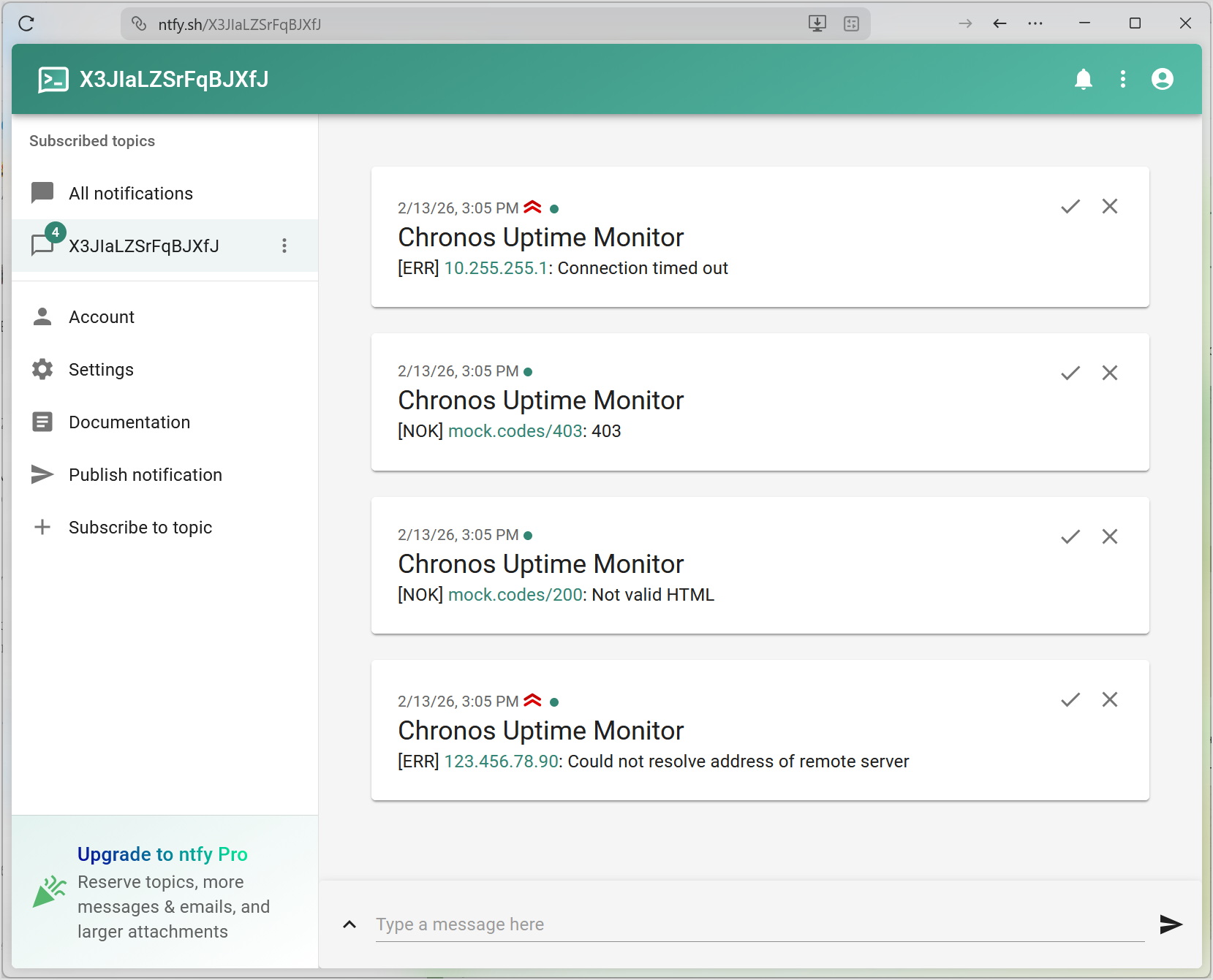
To receive the notifications on your phone, install ntfy mobile app and subscribe to the same topic.
In the final chapter, we'll see how to scale our application and add some finishing touches!
Scaling & Finishing Touches
Goal: Learn how to use semaphores to control concurrency.
Source code: chapter7/src/uptimemon.nim
Our app is almost ready to run on production and do regular background URI checks.
However, there's one issue we need to address before we can feed it tens of URIs and wrap it in a while true: we need to limit the number of simultaneous checks. If we don't do that, our app can potentially run out of file descriptors or choke the DNS resolver with 20+ requests.
Instead of simultaneusly launching checks for all URIs in the list, we'll run them in batches of 5, i.e. no more than 5 checks will run at any given moment, keeping resource usage low and under control.
To achieve that, we'll use a semaphore—an special object that a function must acquire to run and must release after it's finished. A semaphore can be acquired by a fixed number of function at any moment, and this is how it regulates concurrency.
Here's the code with a semaphore and an infinite loop added:
import std/sequtils
import chronos/apps/http/httpclient

const
  maxConcurrency = 5
  ntfyTopic = "<YOUR_NTFY_TOPIC_NAME>"
  uris = @[
    "https://duckduckgo.com/?q=chronos", "https://mock.codes/403",
    "http://10.255.255.1", "https://html.spec.whatwg.org",
    "https://mock.codes/200", "https://github.com", "https://archive.org",
    "https://nim-lang.org", "https://w3.org", "https://free.technology",
    "https://codeberg.org", "https://nimble.directory", "https://status.app",
    "https://keycard.tech", "https://stackoverflow.com", "https://nimbus.team",
    "https://logos.co", "https://forum.nim-lang.org", "https://acid.info",
    "https://vac.dev", "https://expired.badssl.com", "http://10.255.255.2",
    "http://10.255.255.3",
  ]

proc sendAlert(
    session: HttpSessionRef, message: string, priority = 3
) {.async: (raises: [CancelledError]).} =
  let
    headers = {"Title": "Chronos Uptime Monitor", "Priority": $priority}
    body = message.stringToBytes()
    request = HttpClientRequestRef.new(
      session,
      "https://ntfy.sh/" & ntfyTopic,
      meth = MethodPost,
      headers = headers,
      body = body,
    ).valueOr:
      echo "[WRN] Failed to send alert: " & error
      return

  try:
    let response = await request.send().wait(5.seconds)
    await response.closeWait()
  except HttpError, FuturePendingError, AsyncTimeoutError:
    echo "[WRN] Failed to send alert: " & getCurrentExceptionMsg()
  finally:
    await request.closeWait()

proc findMarker(
    bodyReader: HttpBodyReader
): Future[bool] {.async: (raises: [AsyncStreamError, CancelledError]).} =
  const
    marker = "<html"
    readLimit = 10 * 1024

  var
    totalRead = 0
    sample = newString(len(marker) - 1)
    found = false

  proc findMarkerInSample(data: openArray[byte]): (int, bool) =
    if len(data) == 0:
      (0, false)
    else:
      sample = sample[^(len(marker) - 1) .. high(sample)]
      sample &= bytesToString(data)
      found = marker in sample
      totalRead += len(data)
      (len(data), found and totalRead <= readLimit)

  await bodyReader.readMessage(findMarkerInSample)
  found

proc check(
    session: HttpSessionRef, uri: string, semaphore: AsyncSemaphore
) {.async: (raises: [CancelledError]).} =
  await acquire(semaphore)

  defer:
    try:
      release(semaphore)
    except AsyncSemaphoreError:
      echo "Could not release a lock: " & getCurrentExceptionMsg()

  let
    request = HttpClientRequestRef.new(session, uri).valueOr:
      echo "[ERR] " & uri & ": " & error
      return
    response =
      try:
        await request.send().wait(5.seconds)
      except HttpError, AsyncTimeoutError:
        echo "[ERR] " & uri & ": " & getCurrentExceptionMsg()
        return
      finally:
        await request.closeWait()

  try:
    if response.status == 200:
      let
        bodyReader = response.getBodyReader()
        markerFound =
          try:
            await bodyReader.findMarker()
          finally:
            await bodyReader.closeWait()

      if markerFound:
        echo "[OK] " & uri
      else:
        let message = "[NOK] " & uri & ": Not valid HTML"
        echo message
        await session.sendAlert(message)
    else:
      let message = "[NOK] " & uri & ": " & $response.status
      echo message
      await session.sendAlert(message)
  except HttpError, AsyncStreamError:
    let message = "[ERR] " & uri & ": " & getCurrentExceptionMsg()
    echo message
    await session.sendAlert(message, 4)
  finally:
    await response.closeWait()

proc check(uris: seq[string]) {.async: (raises: []).} =
  let
    session = HttpSessionRef.new()
    semaphore = newAsyncSemaphore(maxConcurrency)

  try:
    while true:
      echo "Checking " & $len(uris) & " URIs:"
      let
        futures = uris.mapIt(session.check(it, semaphore))

      try:
        await allFutures(futures)
      except CancelledError:
        await cancelAndWait(futures)
        break

      echo "Done. Next check in 10 seconds."
      try:
        await sleepAsync(10.seconds)
      except CancelledError:
        break
  except CancelledError:
    discard
  finally:
    await session.closeWait()

when isMainModule:
  waitFor check(uris)
Let's see what changed.
const
  maxConcurrency = 5
We define a constant that would determine the capacity of our semaphore.
uris = @[
  "https://duckduckgo.com/?q=chronos", "https://mock.codes/403",
  "http://10.255.255.1", "https://html.spec.whatwg.org",
  "https://mock.codes/200", "https://github.com", "https://archive.org",
  "https://nim-lang.org", "https://w3.org", "https://free.technology",
  "https://codeberg.org", "https://nimble.directory", "https://status.app",
  "https://keycard.tech", "https://stackoverflow.com", "https://nimbus.team",
  "https://logos.co", "https://forum.nim-lang.org", "https://acid.info",
  "https://vac.dev", "https://expired.badssl.com", "http://10.255.255.2",
  "http://10.255.255.3",
]
We've added more URIs to the list to make batching effect visible.
proc check(
    session: HttpSessionRef, uri: string, semaphore: AsyncSemaphore
) {.async: (raises: [CancelledError]).} =
  await acquire(semaphore)

  defer:
    try:
      release(semaphore)
    except AsyncSemaphoreError:
      echo "Could not release a lock: " & getCurrentExceptionMsg()
We've modified check function for a single URI so that it accepts a semaphore (of typeAsyncSemaphore), waits to acquire it, and releases it at the end (we use defer to postpone the release).
With this short addition, we prevent check from running if the semaphore is full.
Because releasing a semaphore can raise a AsyncSemaphoreError and it would happen outside of our managed try block, we wrap the release call in its own try..except block to handle it gracefully and prevent it from bubbling up.
proc check(uris: seq[string]) {.async: (raises: []).} =
  let
    session = HttpSessionRef.new()
    semaphore = newAsyncSemaphore(maxConcurrency)
In the check function for a URI sequence, we create a semaphore of the required capacity.
try:
  while true:
Instead of a one-off launch, we do the checks in an infinite loop. We wrap the entire loop in a try..finally block to ensure the session is always closed when the program stops.
echo "Checking " & $len(uris) & " URIs:"
let
  futures = uris.mapIt(session.check(it, semaphore))

try:
  await allFutures(futures)
except CancelledError:
  await cancelAndWait(futures)
  break
Then we pass the semaphore to check for each URI using mapIt. We also add a try..except CancelledError block around allFutures to ensure that if the program is stopped (e.g. by pressing Ctrl+C), all pending requests are cancelled and cleaned up properly. Note that in this case, we break the loop to finish the execution gracefully.
We've added an echo to denote the start of each cycle.
echo "Done. Next check in 10 seconds."
try:
  await sleepAsync(10.seconds)
except CancelledError:
  break
Finally, print the message to mark the end of a cycle and wait 10 seconds before the next one.
Even though we set the program to wait for 10 seconds before the next check loop, in reality the waiting time will be longer because there is some delay for the system to wake up and resume execution.
This is called drift. For an uptime monitor, this isn't critical but there are cases where you would need to compensate for it.
Run the program and you'll see an even flow of statuses in your terminal.
HTTP Server: Status Dashboard
In this tutorial, we'll build a dashboard server for the uptime monitor. This server will provide an API to receive status reports and a basic (since this is not a frontend tutorial) web interface to view the current status of monitored services.
While building our dashboard, you'll learn how to setup up an async HTTP server, handle different request types, process JSON data, and process requests using middlewares.
The complete application (split into chapters to help you track progress) is available at examples/http_server.
Prerequisites
To go through the tutorial, you'll need a computer with a stable Internet connection, any text editor, and a console (aka terminal emulator). Familiarity with the concepts of HTTP requests and async routines as well as Nim knowledge will help you along but are not required.
Before you start, make sure you have Nim programming language and Nimble package manager installed using the official installation guide.
We'll use Nimble to initialize our project and manage its dependencies. Each chapter in this tutorial is a separate Nimble project, and we'll show you how to set them up as we progress.
Setting Up a Basic HTTP Server
Goal: Learn how to create and start a simple HTTP server with Chronos.
Source code: chapter1/src/dashboard.nim
First, let's initialize a new binary project with Nimble. Switch to your preferred project directory in your terminal and run:
$ nimble init dashboard
When prompted, choose binary for the package type.
Now, open the generated dashboard.nimble file and add chronos to the dependencies:
# Dependencies

requires "nim >= 2.0.0"
requires "chronos"
Finally, open src/dashboard.nim and replace the code in it with this (we'll go through each line in a moment):
import chronos/apps/http/httpserver

proc handler(
    reqfence: RequestFence
): Future[HttpResponseRef] {.async: (raises: [CancelledError]).} =
  if reqfence.isErr():
    return defaultResponse()

  let request = reqfence.get()

  try:
    await request.respond(Http200, "Hello, Chronos!")
  except HttpWriteError:
    defaultResponse()


proc main() {.async: (raises: [TransportAddressError, CancelledError]).} =
  let
    address = initTAddress("127.0.0.1:8080")
    server = HttpServerRef.new(address, handler).valueOr:
      echo "Unable to start HTTP server: " & error
      return

  server.start()
  echo "HTTP server running on http://127.0.0.1:8080"

  try:
    await server.join()
  finally:
    await server.stop()
    await server.closeWait()


when isMainModule:
  waitFor main()
To execute the project, run this command from the dashboard directory:
$ nimble run
You should see the following message in your terminal:
HTTP server running on http://127.0.0.1:8080
Now, open your web browser and go to 127.0.0.1:8080. You should see "Hello, Chronos!".
Line-by-Line Explanation
import chronos/apps/http/httpserver
httpserver module implements the HTTP server capabilities, i.e. listening for incoming connections and responding to HTTP requests.
proc handler(
    reqfence: RequestFence
): Future[HttpResponseRef] {.async: (raises: [CancelledError]).} =
  if reqfence.isErr():
    return defaultResponse()

  let request = reqfence.get()

  try:
    await request.respond(Http200, "Hello, Chronos!")
  except HttpWriteError:
    defaultResponse()
We define a handler function that will be called for every incoming request.
Note that this function takes a RequestFence as an argument. RequestFence is a Result type that can contain either a valid HttpRequestRef or an error. This allows Chronos to notify us if something went wrong during request parsing.
Result comes from results library. It's somewhat similar to Nim's built-in Options type but more powerful. Chronos uses it all around the place whenever a function can return a result or an error.
The function is annotated with the async pragma and raises: [CancelledError] (CancelledError) according to Chronos's checked exceptions.
Inside the handler, we first check if the request was received correctly. If not, we return a defaultResponse(), which is simply an empty response.
If the request is valid, we use the respond method to send a simple string back to the client with an HTTP 200 OK status.
We wrap the respond call in a try-except block to handle potential network errors (HttpWriteError). Note that we let CancelledError propagate to the caller instead of catching it.
proc main() {.async: (raises: [TransportAddressError, CancelledError]).} =
  let
    address = initTAddress("127.0.0.1:8080")
    server = HttpServerRef.new(address, handler).valueOr:
      echo "Unable to start HTTP server: " & error
      return

  server.start()
  echo "HTTP server running on http://127.0.0.1:8080"

  try:
    await server.join()
  finally:
    await server.stop()
    await server.closeWait()
In the main function, we:
- Define the address and port to listen on (
127.0.0.1:8080). - Create an instance of the server using
HttpServerRef.new. - Start the server with
server.start(). - Use
server.join()to wait until the server is stopped (which, in this case, will be never, until we manually terminate the program withCtrl-C). - In the
finallyblock, we ensure the server is stopped and its resources are released correctly.
when isMainModule:
  waitFor main()
Finally, we use waitFor to start our async main routine.
Handling Multiple Routes
Goal: Learn how to handle different request paths in your HTTP server.
Source code: chapter2/src/dashboard.nim
Our first server version could only respond with one message regardless of the URL. Real-world applications usually need to handle multiple routes.
Let's update our server to handle different paths differently:
import chronos/apps/http/httpserver

proc handler(
    reqfence: RequestFence
): Future[HttpResponseRef] {.async: (raises: [CancelledError]).} =
  let request = reqfence.valueOr:
    return defaultResponse()

  try:
    case request.uri.path
    of "/":
      await request.respond(Http200, "Welcome to the Status Dashboard!")
    of "/status":
      await request.respond(Http200, "The server is operational.")
    else:
      await request.respond(Http404, "Page not found.")
  except HttpWriteError:
    defaultResponse()


proc main() {.async: (raises: [TransportAddressError, CancelledError]).} =
  let
    address = initTAddress("127.0.0.1:8080")
    server = HttpServerRef.new(address, handler).valueOr:
      echo "Unable to start HTTP server: " & error
      return

  server.start()
  echo "HTTP server running on http://127.0.0.1:8080"

  try:
    await server.join()
  finally:
    await server.stop()
    await server.closeWait()


when isMainModule:
  waitFor main()
To test the routes, run the project with nimble run and try visiting these URLs in your browser:
Routing Logic
The change is how we process the incoming request in the handler:
try:
  case request.uri.path
  of "/":
    await request.respond(Http200, "Welcome to the Status Dashboard!")
  of "/status":
    await request.respond(Http200, "The server is operational.")
  else:
    await request.respond(Http404, "Page not found.")
except HttpWriteError:
  defaultResponse()
We use a case statement to check the request.uri.path.
- For the root path
/, we return a welcome message. - For the
/statuspath, we return a simple operational message. - For any other path, we use the
elsebranch to return an HTTP 404 Not Found error.
By using request.respond, we can easily control both the HTTP status code and the response body.
Handling POST Requests and Processing JSON
Goal: Learn how to handle POST requests and process incoming JSON data.
Source code: chapter3/src/dashboard.nim
In a real-life application, you often need to receive data from clients, not just serve static content. Our dashboard needs to receive status reports from other services.
Let's update our server to handle POST requests containing JSON data and store these reports in memory:
import chronos/apps/http/httpserver
import std/[json, tables]

proc handler(reports: TableRef[string, string]): HttpProcessCallback2 =
  proc(
      reqfence: RequestFence
  ): Future[HttpResponseRef] {.async: (raises: [CancelledError]).} =
    let request = reqfence.valueOr:
      return defaultResponse()

    try:
      case request.uri.path
      of "/":
        await request.respond(Http200, "Welcome to the Status Dashboard!")

      of "/status":
        var output = "Current Service Status:\n"
        if reports.len == 0:
          output.add("- No reports available.")
        else:
          for name, status in reports:
            output.add("- " & name & ": " & status & "\n")
        await request.respond(Http200, output)

      of "/report":
        if request.meth != MethodPost:
          return await request.respond(Http405, "Method Not Allowed")

        let
          body = await request.getBody()
          data =
            try:
              parseJson(bytesToString(body))
            except CatchableError:
              return await request.respond(Http400, "Invalid JSON.")
          name =
            try:
              data["name"].getStr()
            except KeyError:
              return await request.respond(Http400, "Missing 'name' field.")
          status =
            try:
              data["status"].getStr()
            except KeyError:
              return await request.respond(Http400, "Missing 'status' field.")

        reports[name] = status
        echo "Received report: " & name & " is " & status

        await request.respond(Http200, "Report received.")
      else:
        await request.respond(Http404, "Page not found.")
    except HttpError as exc:
      defaultResponse(exc)

proc main() {.async: (raises: [TransportAddressError, CancelledError]).} =
  var reports = newTable[string, string]()

  let
    address = initTAddress("127.0.0.1:8080")
    server = HttpServerRef.new(address, handler(reports)).valueOr:
      echo "Unable to start HTTP server: " & error
      return

  server.start()
  echo "HTTP server running on http://127.0.0.1:8080"

  try:
    await server.join()
  finally:
    await server.stop()
    await server.closeWait()

when isMainModule:
  waitFor main()
To test this version, run it with nimble run and use a tool like curl to send a POST request:
$ curl -X POST -H "Content-Type: application/json" -d '{"name": "google.com", "status": "UP"}' http://127.0.0.1:8080/report
Then, visit 127.0.0.1:8080 in your browser to see the updated status.
Handling POST Requests
The HTTP protocol divides each request and response into a header and a body. The header contains metadata like the request method and path, while the body contains the actual content — the JSON payload in our case. This is true for both requests and responses.
proc handler(reports: TableRef[string, string]): HttpProcessCallback2 =
  proc(
      reqfence: RequestFence
  ): Future[HttpResponseRef] {.async: (raises: [CancelledError]).} =
The first change you'll notice is that we wrapped our handler proc with another function that returns the actual handler (of type HttpProcessCallback2). This is done to enable passing an input param reports that we'll use to store the statuses.
In the handler, we added logic for the /report path:
of "/report":
  if request.meth != MethodPost:
    return await request.respond(Http405, "Method Not Allowed")

  let
    body = await request.getBody()
    data =
      try:
        parseJson(bytesToString(body))
      except CatchableError:
        return await request.respond(Http400, "Invalid JSON.")
    name =
      try:
        data["name"].getStr()
      except KeyError:
        return await request.respond(Http400, "Missing 'name' field.")
    status =
      try:
        data["status"].getStr()
      except KeyError:
        return await request.respond(Http400, "Missing 'status' field.")

  reports[name] = status
  echo "Received report: " & name & " is " & status

  await request.respond(Http200, "Report received.")
- We check if the request method is
MethodPost. - We use
request.getBody()to asynchronously read the entire request body. bodyis an array of bytes, so we need to convert it to a string before we can parse it. To do that, we usebytesToStringfunction fromchronos/apps/http/httpcommon.- We use Nim's
std/jsonlibrary to parse the body as JSON. We wrap this in atry-exceptblock to handle parsing errors. We want to catch all parsing errors at this point, so it's a rare case where catching genericCatchableErroris fine. - We extract the relevant fields and store them in our table. We use a separate
try-exceptblock to catchKeyErrorif the fields are missing.
When dealing with JSON from clients, we must assume it can be malformed or missing fields. We handle these cases by catching parsing errors and KeyError exceptions, returning an appropriate HTTP 400 Bad Request status.
Generating Response
Finally, for the /status path, we now generate a dynamic string based on the data in our table:
of "/status":
  var output = "Current Service Status:\n"
  if reports.len == 0:
    output.add("- No reports available.")
  else:
    for name, status in reports:
      output.add("- " & name & ": " & status & "\n")
  await request.respond(Http200, output)
Storing Data in Memory
We use an in-memory TableRef to store our status reports.
var reports = newTable[string, string]()

let
  address = initTAddress("127.0.0.1:8080")
  server = HttpServerRef.new(address, handler(reports)).valueOr:
    echo "Unable to start HTTP server: " & error
    return

server.start()
echo "HTTP server running on http://127.0.0.1:8080"
We pass reports to the handler generating function to generate a handler that would store statuses to it.
In a real app you would store your persistent data in a database of key-value storage. In this tutorial, we use a Table for simplicity's sake.
Logging Requests with Middleware
Goal: Learn how to extend your server's functionality with middleware.
Source code: chapter4/src/dashboard.nim
Middleware is a way to wrap your request handler with additional logic. This is useful for cross-cutting concerns like logging, authentication, modifying request and response headers, and for sharing a single HTTP server between multiple services (e.g. a metrics server and a REST API server).
Let's add a simple logging middleware that tracks how long each request takes to process:
import chronos/apps/http/httpserver
import std/[json, tables, times, monotimes]

proc loggingMiddleware(
    middleware: HttpServerMiddlewareRef,
    reqfence: RequestFence,
    nextHandler: HttpProcessCallback2,
): Future[HttpResponseRef] {.async: (raises: [CancelledError]).} =
  let startTime = getMonoTime()

  let response = await nextHandler(reqfence)

  let duration = getMonoTime() - startTime
  if reqfence.isOk():
    let request = reqfence.get()
    echo $request.meth & " " & request.uri.path & " processed in " &
      $duration.inMilliseconds & " ms"

  response


proc handler(reports: TableRef[string, string]): HttpProcessCallback2 =
  proc(
      reqfence: RequestFence
  ): Future[HttpResponseRef] {.async: (raises: [CancelledError]).} =
    let request = reqfence.valueOr:
      return defaultResponse()

    try:
      case request.uri.path
      of "/":
        await request.respond(Http200, "Welcome to the Status Dashboard!")
      of "/status":
        var output = "Current Service Status:\n"
        if reports.len == 0:
          output.add("- No reports available.")
        else:
          for name, status in reports:
            output.add("- " & name & ": " & status & "\n")
        await request.respond(Http200, output)
      of "/report":
        if request.meth != MethodPost:
          return await request.respond(Http405, "Method Not Allowed")

        let
          body = await request.getBody()
          data =
            try:
              parseJson(bytesToString(body))
            except CatchableError:
              return await request.respond(Http400, "Invalid JSON.")
          name =
            try:
              data["name"].getStr()
            except KeyError:
              return await request.respond(Http400, "Missing 'name' field.")
          status =
            try:
              data["status"].getStr()
            except KeyError:
              return await request.respond(Http400, "Missing 'status' field.")

        reports[name] = status
        echo "Received report: " & name & " is " & status

        await request.respond(Http200, "Report received.")
      else:
        await request.respond(Http404, "Page not found.")
    except HttpError as exc:
      defaultResponse(exc)


proc main() {.async: (raises: [TransportAddressError, CancelledError]).} =
  var reports = newTable[string, string]()
  let
    middlewares = [HttpServerMiddlewareRef(handler: loggingMiddleware)]
    address = initTAddress("127.0.0.1:8080")
    server = HttpServerRef.new(address, handler(reports), middlewares = middlewares).valueOr:
      echo "Unable to start HTTP server: " & error
      return

  server.start()
  echo "HTTP server running on http://127.0.0.1:8080"

  try:
    await server.join()
  finally:
    await server.stop()
    await server.closeWait()


when isMainModule:
  waitFor main()
To test the middleware, run the project with nimble run and make some requests to your server (with curl and from your browser).
Defining a Middleware
A middleware handler is a function that takes the current middleware object, the RequestFence, and the nextHandler (which is an HttpProcessCallback2) in the chain:
proc loggingMiddleware(
    middleware: HttpServerMiddlewareRef,
    reqfence: RequestFence,
    nextHandler: HttpProcessCallback2,
): Future[HttpResponseRef] {.async: (raises: [CancelledError]).} =
  let startTime = getMonoTime()

  let response = await nextHandler(reqfence)

  let duration = getMonoTime() - startTime
  if reqfence.isOk():
    let request = reqfence.get()
    echo $request.meth & " " & request.uri.path & " processed in " &
      $duration.inMilliseconds & " ms"

  response
- We record the current time before processing the request using
getMonoTimefromstd/monotimes. - We call
await nextHandler(reqfence)to pass the request to the next middleware or the main handler. - After the handler returns, we calculate the duration and print a log message. To get the processing duration in milliseconds, we use
inMillisecondsfromstd/times. - We return the
responsereceived from the handler chain.
You may wonder why HttpProcessCallback2 has a 2 in its name and why don't we use HttpProcessCallback.
The difference is that HttpProcessCallback2 is a newer and stricter version while HttpProcessCallback is kept for backward compatibility.
So, long story short: use HttpProcessCallback2 unless you're sure you need HttpProcessCallback.
Registering Middleware
To use middleware, you need to create an array of HttpServerMiddlewareRef and pass it to the server constructor:
middlewares = [HttpServerMiddlewareRef(handler: loggingMiddleware)]
Then, include it in HttpServerRef.new:
proc main() {.async: (raises: [TransportAddressError, CancelledError]).} =
  var reports = newTable[string, string]()
  let
    middlewares = [HttpServerMiddlewareRef(handler: loggingMiddleware)]
    address = initTAddress("127.0.0.1:8080")
    server = HttpServerRef.new(address, handler(reports), middlewares = middlewares).valueOr:
      echo "Unable to start HTTP server: " & error
      return

  server.start()
  echo "HTTP server running on http://127.0.0.1:8080"

  try:
    await server.join()
  finally:
    await server.stop()
    await server.closeWait()
Now, every time your server receives a request, you'll see a log message in your terminal with the method, path, and processing time.
Bonus Track - Performance and Benchmarking
Goal: Understand how Chronos performs under load and learn how to benchmark your server.
Source code: chapter4/src/dashboard.nim
One of the main reasons to use Chronos is its performance. Thanks to its asynchronous architecture, a single-threaded Chronos server can handle thousands of concurrent connections with minimal overhead.
In this chapter, we'll see check how our app performs under load.
Benchmarking with ApacheBench (ab)
ApacheBench (ab) is a popular tool for benchmarking HTTP servers. It's pre-installed on many systems or can be easily installed (e.g., brew install httpd on macOS or sudo apt-get install apache2-utils on Linux). For Windows, it can be obtained through various Apache distributions.
Running the Benchmark
First, run your server in release mode:
$ nimble run -d:release
There are no code changes in this chapter. We're using the code from the previous chapter, just compiling it in the release mode to squeeze maximum performance from our server.
Now, in a separate terminal window, run the benchmark against the root path:
$ ab -n 10000 -c 100 http://127.0.0.1:8080/
Here's what these flags mean:
-n 10000: Perform 10,000 requests.-c 100: Keep 100 requests concurrent.
Understanding the Results
When the benchmark finishes, you'll see a report, which looks similar to this:
Server Software:
Server Hostname:        127.0.0.1
Server Port:            8080

Document Path:          /
Document Length:        32 bytes

Concurrency Level:      100
Time taken for tests:   15.445 seconds
Complete requests:      10000
Failed requests:        0
Total transferred:      1670000 bytes
HTML transferred:       320000 bytes
Requests per second:    647.47 [#/sec] (mean)
Time per request:       154.448 [ms] (mean)
Time per request:       1.544 [ms] (mean, across all concurrent requests)
Transfer rate:          105.59 [Kbytes/sec] received

Connection Times (ms)
              min  mean[+/-sd] median   max
Connect:        0    1   0.3      0       7
Processing:     4  153  19.3    154     209
Waiting:        1  145  18.5    146     199
Total:          5  154  19.3    154     210
ERROR: The median and mean for the initial connection time are more than twice the standard
       deviation apart. These results are NOT reliable.

Percentage of the requests served within a certain time (ms)
  50%    154
  66%    166
  75%    169
  80%    170
  90%    175
  95%    180
  98%    186
  99%    189
 100%    210 (longest request)
Pay attention to these metrics:
- Requests per second (RPS): How many requests your server processed per second. Even with the overhead of JSON parsing and logging, Chronos should achieve hundreds of RPS even on a common laptop.
- Time per request: The average time it took to complete a single reques. You'll see two numbers, one roughly 100 times larger than the other. This is due to the concurrency factor of 100. The smaller number represents the actuall processing time per request. This should be close to 1 ms.
- Failed requests: How many requests were not successful. With Chronos, this should be zero even under high load.
Updating this book
To contribute to this book, fork the repository, edit the book locally, and send a pull request with your changes.
Modifying the content
The book's content is stored in the form of .md files in docs/src directory. For example, this page's source is at docs/src/book.md.
To edit the content, you'll need any text editor and familiarity with Markdown syntax.
If you want to add a new page, edit the file docs/src/SUMMARY.md. It's a list of all pages in this book, groupped into parts:
- [Introduction](./introduction.md)
- [Examples](./examples.md)

# User guide

- [Core concepts](./concepts.md)
- [`async` functions](./async_procs.md)
- [Errors and exceptions](./error_handling.md)
- [Threads](./threads.md)
- [Tips, tricks and best practices](./tips.md)
- [Porting code to `chronos`](./porting.md)
- [HTTP server middleware](./http_server_middleware.md)

# Developer guide

- [Updating this book](./book.md)
If mdBook detects a new page in SUMMARY.md that doesn't have a corresponding .md file, it will create it automatically during next build and you'll be able to edit it as any other page.
Building the docs locally
This book is created using mdBook so to test your changes locally, you'll need to have it along with preprocessors installed.
If you have a working Rust toolchain set up, install the cargo crates with cargo install:
cargo install mdbook@0.4.36 mdbook-toc@0.14.1 mdbook-open-on-gh@2.4.3 mdbook-admonish@0.14.0
If you don't have it, the easiest way to install mdBook without installing Rust is to use cargo-binstall:
cargo-binstall mdbook@0.4.36 mdbook-toc@0.14.1 mdbook-open-on-gh@2.4.3 mdbook-admonish@0.14.0
After that, you can build and view the docs locally with this command:
mdbook serve --hostname:0.0.0.0 docs
Open localhost:3000 your browser to see the docs.
mdbook serve automatically detects changes in the docs sources, rebuilds the site, and refreshes the page in the browser to show the new version.